


Have you noticed that the name on your National Identification Number (NIN) does not match the name on your bank account? Perhaps your date of birth is incorrect, you recently got married and need to change your surname, or you have changed your phone number and want to update your NIN records.
You do not necessarily need to visit a NIMC office to start correcting these details. The National Identity Management Commission (NIMC) provides an online Self-Service Modification Portal that allows eligible Nigerians to request changes to their personal information using their smartphones or computers.
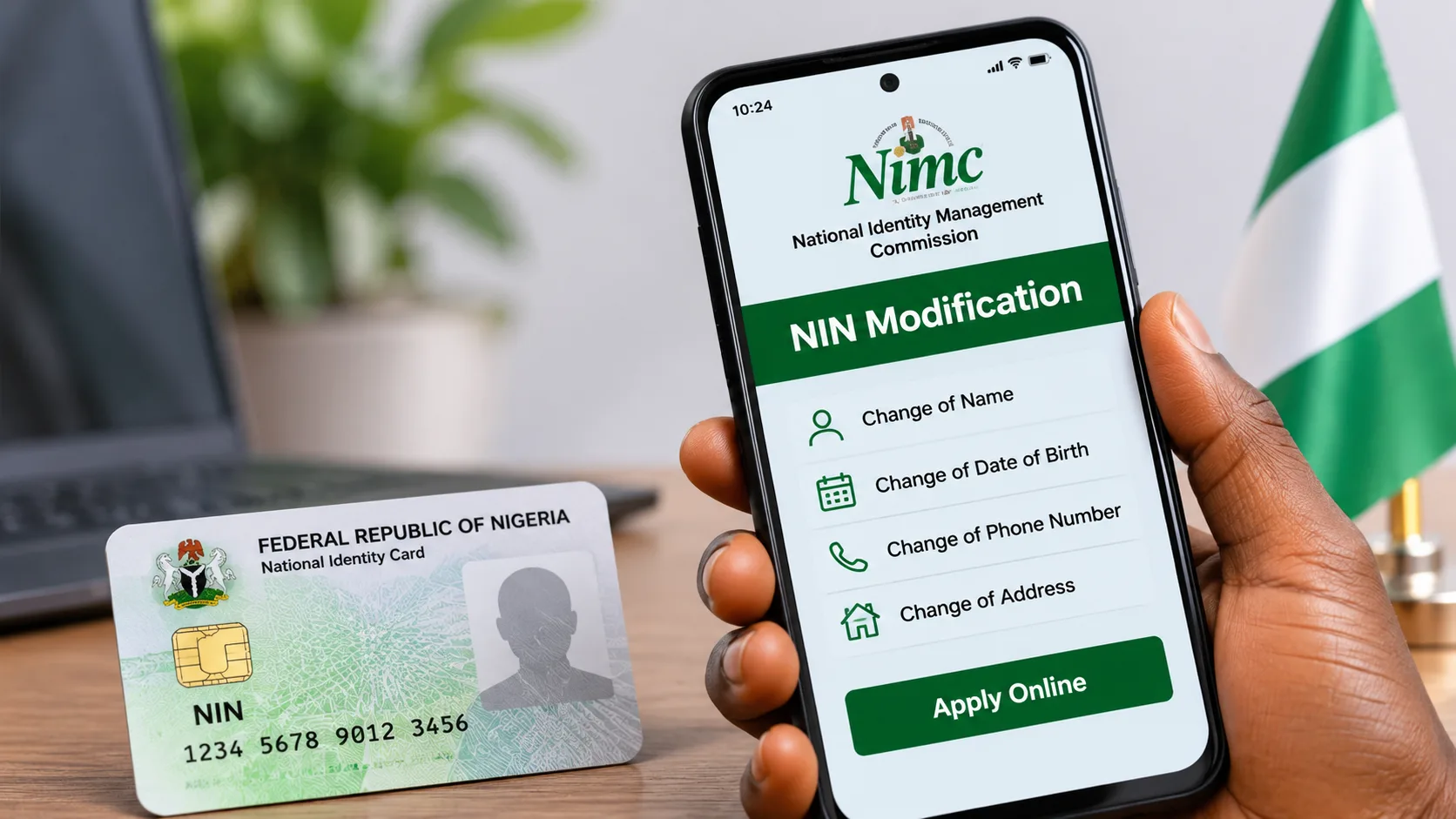
Through the portal, you can request changes to your name, date of birth, phone number and residential address. However, each type of modification has its own requirements, supporting documents and processing fees.
In this guide, we explain how to modify your NIN online in Nigeria, the official portal to use, the documents you need, how much NIMC charges and what to do if your application is delayed or unsuccessful.
What Is NIN Modification?
NIN modification is the process of correcting or updating personal information registered with the National Identity Management Commission.
When you first register for your National Identification Number, NIMC collects information such as your full name, date of birth, phone number, residential address and other identification details.
Sometimes, mistakes happen during registration. You may also need to update your information because of changes in your personal circumstances.
For example:
Your surname was incorrectly spelt during NIN registration.
Your date of birth does not match your birth certificate.
You got married and want to update your surname.
You lost your old SIM card and now use a different phone number.
You moved to another address.
Your personal information needs to be corrected to match your other official documents.
Instead of registering for another NIN, you should request an approved modification of your existing records.
Important: Your NIN itself does not change when your personal information is successfully updated. You retain the same identification number; only the approved details are corrected.
What NIN Details Can You Change Online?
NIMC's self-service modification portal currently supports four major categories of changes:
| Information | Can it be modified online? |
|---|---|
| First name | Yes |
| Middle name | Yes |
| Surname | Yes |
| Date of birth | Yes, subject to special requirements |
| Phone number | Yes |
| Residential address | Yes |
Other information, including place of birth and state of origin, may be eligible for modification under NIMC's broader modification procedures. However, do not assume that every field can be changed through the online self-service portal.
Some information is classified as non-updatable, including your NIN, gender, registration centre and certain enrolment records.
If the particular information you want to correct is not available on your online dashboard, contact NIMC or visit an authorised enrolment centre for guidance.
What Is the Official NIN Modification Portal in Nigeria?
The official NIN modification website is: https://selfservicemodification.nimc.gov.ng/
This is the National Identity Management Commission's online platform for requesting eligible changes to your NIN information.
You can access the website using a smartphone, tablet or computer with an internet connection.
Do not confuse the modification portal with websites offering NIN retrieval, NIN verification or other identity services. They serve different purposes.
Before entering your NIN, uploading documents or making payment, confirm that the website address ends in nimc.gov.ng.
You should also avoid paying individuals on WhatsApp or Telegram who claim they can modify your NIN through special connections.
How to Modify Your NIN Online in Nigeria
If you want to correct your NIN information without visiting a physical NIMC office, follow these steps.
Step 1: Visit the official NIMC modification portal
Open Chrome, Safari or another browser on your smartphone or computer.
Visit:
https://selfservicemodification.nimc.gov.ng/
Make sure you are using the correct official website.
Step 2: Create an account or log in
If you have not used the platform before, follow the registration instructions to create your self-service account.
If you already have an account, log in with your existing details.
Keep your registered email address and other login information available.
Step 3: Verify your NIN
Enter your National Identification Number and complete the identity verification process requested by the portal.
Follow the instructions displayed on your screen.
Step 4: Select the information you want to change
After successful verification, access your dashboard and select the relevant modification.
Depending on your needs, this could be:
Change of name.
Change of date of birth.
Change of phone number.
Change of residential address.
Make sure you select the correct option before proceeding.
Step 5: Upload the required documents
NIMC requires supporting documents to establish that the information you want to change is accurate.
For example, someone changing their surname after marriage will need the appropriate marriage documentation.
Someone correcting their date of birth will need the required National Population Commission certificate or attestation.
The documents must be clear and readable.
Step 6: Make the required payment
The portal provides an electronic payment process through Paystack.
Check the amount displayed before completing the transaction.
Do not make payment through an individual or an unofficial website.
Step 7: Review and submit your application
Before submitting, carefully check the information you have entered.
A spelling mistake or incorrect date could create another problem.
Once satisfied, complete the required declarations and submit your modification request.
Step 8: Track your application
Keep your transaction slip and payment confirmation.
You can return to your dashboard to check the status of your request.
According to NIMC, successful applicants receive a notification after approval, and their updated NIN slip can be sent to their registered email address or printed from the dashboard.
How to Change Your Name on NIN Online
If your name is incorrectly spelt on your NIN or you have changed your surname after marriage, you can request a name modification.
Common reasons include:
Incorrect spelling of your first name.
Incorrect middle name.
Wrong surname.
Change of surname after marriage.
Legally recognised change of name.
Documents required to change your NIN name
According to NIMC's published requirements, applicants may need:
Sworn court affidavit.
Newspaper extract.
Marriage certificate, where the change is related to marriage.
Another government-issued identification document.
The documents required may depend on the reason for the change.
Steps to change your name
Visit the official NIMC modification portal.
Log in to your account.
Verify your NIN.
Select the name modification option.
Enter your correct name.
Upload the required supporting documents.
Pay the applicable fee.
Review your information.
Submit your application.
Example: If your NIN shows your maiden surname but you now use your husband's surname after marriage, you can request a correction using the relevant marriage documentation and other supporting documents required by NIMC.
Make sure the name you submit matches your supporting documents.
How to Change Your Date of Birth on NIN Online
Date-of-birth correction is more sensitive than other NIN modifications because it involves changing an important identity record.
NIMC requires specific documentation from the National Population Commission (NPC).
The commission's online instructions distinguish between applicants based on their year of birth.
| Year of birth | Required document |
|---|---|
| Born before 1992 | Digitised NPC Attestation Certificate |
| Born after 1992 | Digitised NPC Birth Certificate |
Steps to correct your date of birth
Visit the NIMC Self-Service Modification Portal.
Log in and verify your NIN.
Select the date-of-birth modification option.
Complete the required payment.
Enter your NPC certificate number.
Validate the certificate.
Upload the required NPC document.
Review the information displayed.
Complete the required attestation.
Submit your application.
An important detail is that the portal retrieves your date of birth from the validated NPC record. You cannot simply type in a different date.
If you have misplaced your birth certificate, you can check the National Population Commission's official website for its birth attestation service.
Visit: https://nationalpopulation.gov.ng/
Important: NIMC places special restrictions on date-of-birth changes. Its published guidance states that the correction is permitted only once in a lifetime. Corrections involving differences of five years or more may require additional processing through a NIMC enrolment centre.
Do not submit a date-of-birth modification until you have confirmed that your NPC documentation contains the correct information.
How to Change Your Phone Number on NIN Online
Have you lost your old SIM card, changed networks or started using a different phone number?
You may need to update the phone number associated with your NIN.
NIMC lists phone number changes among the modifications available through its self-service platform.
For phone number changes resulting from loss or mechanical damage, NIMC's published requirements specify a police report.
Steps to change your NIN phone number
Visit the official NIMC modification portal.
Log in to your account.
Complete the required identity verification.
Select phone number modification.
Enter your new phone number.
Upload the required supporting documents.
Complete the payment.
Submit your request.
How to enter your Nigerian phone number correctly
When entering a Nigerian phone number using the international country code, remove the first zero.
For example:
Correct format:
+2348123456789
Incorrect format:
+23408123456789
This is a common mistake that can cause problems during phone number submission.
Always use your actual active phone number and follow the format displayed on the portal.
How to Change Your Residential Address on NIN
If you have relocated from one state or city to another, you may want to update the residential address associated with your NIN.
For example, someone who previously lived in Enugu but has relocated to Lagos may need to update their address to reflect their current residence.
NIMC identifies the following documents for address modification:
Recent utility bill.
Tenancy agreement.
Bank statement.
Community leader's attestation letter.
Steps to change your NIN address
Visit the NIMC modification portal.
Log in to your account.
Verify your NIN.
Select address modification.
Enter your current residential address.
Upload the required supporting document.
Complete the payment.
Submit your application.
Make sure the document you upload supports the new address you are requesting.
How Much Does NIN Modification Cost in Nigeria?
One of the most common questions Nigerians ask before starting the process is how much NIMC charges to correct their personal information.
According to NIMC's current published fee schedule, the charges are:
| Modification | Published fee |
|---|---|
| Change of name | ₦2,000 |
| Change of phone number | ₦2,000 |
| Change of residential address | ₦2,000 |
| Other eligible fields | ₦2,000 per field |
| Date-of-birth correction | ₦28,574 |
Date-of-birth correction costs considerably more because of the additional verification requirements.
There is also an important issue to understand: some older NIMC pages still display previous charges, including ₦500 per field and ₦15,000 for date-of-birth correction.
For this guide, we have used the newer amounts displayed on NIMC's official fees page.
However, always check the amount shown on the official payment page before proceeding. If you are correcting more than one field, check the total amount displayed at checkout.
Do not pay agents who demand additional money to speed up the process.
How Long Does NIN Modification Take?
The time required to complete a NIN modification depends on the type of correction and the verification process.
NIMC's published service information gives a target of approximately 48–72 hours for self-service modifications.
However, this should not be treated as a guarantee that every application will be approved within that period.
Date-of-birth corrections involving differences of five years or more may require additional processing, with a longer published timeline.
Applications may also take longer if:
Supporting documents are unclear.
Your NPC certificate cannot be validated.
Your identity information does not match.
There are payment issues.
The portal experiences technical problems.
Additional verification is required.
If your application is taking longer than expected, contact NIMC through its official customer support channels.
Important Things to Know Before Modifying Your NIN Online
Before you start, there are a few important instructions from NIMC that could save you from unnecessary problems.
1. Use the same phone or computer
NIMC has warned that your self-service account is tied to the browser and device used during registration.
If you register using Chrome on your Android phone, try to continue using that same browser on that device.
Switching to another device or browser may cause access problems.
2. Do not clear your browser cache unnecessarily
NIMC has specifically warned that clearing your browser cache can reset the device identification associated with your account.
This may lock you out and require an account-unlinking process.
3. Check your information before making payment
Some modification payments are non-refundable.
Make sure your name, date of birth, phone number or address is correct before submitting your request.
4. Do not register for another NIN
If your existing NIN contains incorrect information, request a modification instead of attempting to register for a new identification number.
Your NIN remains the same after an approved modification.
5. Keep your payment receipt
After completing payment, save your receipt and transaction reference.
You may need these details if your application is delayed or you need to contact customer support.
What to Do If Your NIN Modification Is Not Working
Some Nigerians experience difficulties when using the NIMC modification portal.
Here are common problems and what you can do.
Problem: Your NIN is not validating.
Check that you entered the correct NIN and follow the portal's identity verification instructions. If the problem continues, contact NIMC.
Problem: Your payment was successful but the application is not showing.
Keep your payment receipt and transaction reference. Do not immediately pay again. Contact NIMC for assistance.
Problem: Your account is locked.
If you changed your device or cleared your browser cache, you may need to follow NIMC's account-unlinking procedure.
Problem: Your supporting documents were rejected.
Check that the documents are clear, valid and appropriate for the type of modification you selected.
Problem: Your modification is still pending.
Check your dashboard and registered email address. If the processing period has passed, contact NIMC with your transaction reference.
NIMC Customer Care: Where to Report NIN Modification Problems
If you have problems with your application, you can contact the National Identity Management Commission directly.
Here are the customer support details published on its official website:
| Contact method | Details |
|---|---|
| Customer care email | nimccustomercare@nimc.gov.ng |
| Modification enquiries | nimcmodification@nimc.gov.ng |
| Call centre | 0700 2255 646 |
| Toll-free line | 08000616462 |
| Official website | https://nimc.gov.ng/ |
When contacting NIMC, explain the problem clearly and include your transaction reference where applicable.
For your security, do not send your password, banking PIN or OTP to anyone claiming to be a NIMC representative.
1. Can I modify my NIN details online in Nigeria?
Yes. NIMC provides an online Self-Service Modification Portal where eligible Nigerians can request changes to their names, dates of birth, phone numbers and residential addresses.
2. What is the official NIN modification website?
The official website is https://selfservicemodification.nimc.gov.ng/. Always check the website address before entering your personal information.
3. How much does it cost to change a name on NIN?
NIMC's current published fee is ₦2,000 per eligible modification field. Confirm the final amount displayed at checkout before making payment.
4. How much does it cost to correct the date of birth on NIN?
The current fee displayed on NIMC's official fees page is ₦28,574. Applicants must also provide the required National Population Commission documentation.
5. Can I change my NIN phone number without visiting a NIMC office?
Yes. Phone number changes are included among the online self-service modification options. Supporting documents, including a police report for loss or mechanical damage, may be required.
6. Can I change my surname on NIN after marriage?
Yes. You can request a surname change using the official portal. NIMC lists a marriage certificate, sworn affidavit, newspaper extract and other government identification among its name-change requirements.
7. Can I change my date of birth on NIN twice?
NIMC's published guidance states that date-of-birth modification is permitted only once in a lifetime. Confirm your eligibility and supporting documents before applying.
8. How long does NIN modification take?
NIMC's published service information gives a target of approximately 48–72 hours for self-service modifications. Some applications, particularly complicated date-of-birth corrections, may take longer.
9. Can I modify my NIN without visiting an office?
Yes. Eligible name, date-of-birth, phone-number and address corrections can be initiated through the self-service portal. Some cases may still require additional assistance or a visit to an enrolment centre.
10. Will my NIN number change after modification?
No. Your NIN remains the same. Only the approved personal information is updated.
11. What happens if I clear my browser cache after registering?
NIMC warns that clearing your browser cache may reset your device identification and lock access to your self-service account. You may need to follow its account-unlinking procedure.
12. How can I download my updated NIN slip?
After approval, NIMC says your updated slip will be sent to your registered email address. You can also access and print it from your modification dashboard.
Conclusion
Correcting your National Identification Number information in Nigeria is now more convenient because NIMC provides an online self-service platform for eligible modifications.
Whether you want to correct a spelling mistake in your name, update your surname after marriage, change your phone number or correct your date of birth, you can start the process through the official NIMC modification portal.
However, make sure you understand the requirements before applying. Name changes, phone number updates, address corrections and date-of-birth modifications do not all require the same documents or attract the same fees.
Use the official website, prepare your supporting documents, check the payment amount and keep your transaction receipt.
Most importantly, avoid unofficial agents promising faster approval. Your NIN is an important identity record, and any correction should be processed through authorised NIMC channels.
Discussion
No comments yet
Be the first to share your thoughts, analysis, or questions on this story.
Report Comment
Help our editorial moderation team keep discussions constructive and factual.